
Structural Edit Critique and Evaluation for Paul Beverly YouTube Channel
Andrew F. Rosbury
The Rosbury Group
1401 W Hickory St
Denton, TX 76201
Tuesday, August 17, 2021
Paul Beverley
Archive Publications
46 Nightingale Drive
Norwich NR8 6TR, UK
Mr. Paul Beverly:
Thank you for contracting the Rosbury Group to evaluate and offer feedback on your YouTube channel and your tutorial videos on how to program and use Macros. My first experience with using Macros required constant reference with a paperback manual that was not always reader friendly, so I sincerely thank you for your effort and authorship in creating videos that are clear, concise and easy to follow.
Evaluation Process and Methodology
The intention of my critique and feedback is to identify and illustrate improvements that may be made to strengthen viewer engagement and information retention. In choosing which videos to evaluate, I determined that a selection of six videos would be ideal. The factors by which I selected the videos to represent a collective sample are as follows:
1. 1 video with an overall running time of 35 minutes or more. The video selected was “Wildcarding techniques 1.”
2. 1 video with a running time of 20 to 30 minutes. The video selected was “Programming Word macros 4.”
3. 1 video with an overall running time of 15 minutes. The video selected was “Taming Word 365.”
4. 1 video with an overall running time of 5 minutes. The video selected was “Customizing your keystrokes for macros.”
5. 1 video with an overall running time of 3 minutes or under. The video selected was “Speedy Lookup.”
6. 1 video which featured a livestream that allowed synchronous audience interaction. The video selected was “Macro Q&A.”
For the viewing evaluation, I have formulated 3 components of critique which I will use to evaluate the six selected videos. The components of the critiquing method seek to encompass both breadth and depth as viewers of your videos will have differing degrees of experience and knowledge of using Macros.
The 3 Components of Evaluation are as follows:
Content: Evaluate the content of a selection of videos and offer suggestions on how to improve viewer engagement with the recorded content of the selected videos chosen for evaluation.
Structure: Evaluate the narrative structure of the six selected of videos and will offer suggestions on how to improve viewer engagement in the narrative pacing of the selected videos. Suggestions can then be implemented to the other videos on your channel at your discretion.
Cohesion: Evaluate the cohesiveness the six selected of videos and will offer suggestions on how to improve cohesiveness to the other videos that you have created and are currently available on your channel.
My critique and evaluation are based upon the preconceptions that most viewers will be native English speakers or familiar with English as a second language. Most viewers will most likely have a “working” understanding of using Macros and will be familiar with the computer language so as not to be overwhelmed at the pace in which you proceed through the tutorial. I define “working” as a beginner-to-intermediate understanding of Macros and Microsoft Word. Most viewers will be using a desktop computer or laptop computer to program in real-time with your video. Tablet viewers (iPad, iPhone, Microsoft Surface) are possible and would most likely be viewing your tutorials and not programming. Most viewers will be accessing and viewing your videos with the intent to synchronously follow your progress or to learn and to remember what they are viewing.
Component 1: Content Evaluation
In evaluating the content of the six selected, my feedback is based upon the combined viewing of all six videos, with specific examples taken from each video to illustrate suggestion for improvement of viewer engagement and information retention.
Positives
In my previous career as a college instructor, I taught public speaking courses and one of my suggestions to all students to include in all their oral presentations was to introduce themselves to the audience by stating their name. It’s a simple inclusion and it personalizes the experience for both speaker and audience. You introduce yourself by having your name in simple text in red font and include the topic of the video on a notepad application. It is an easy way to display information that is not distracting and is easily minimized when you begin the programming tutorial. These small expressions are welcoming to the viewer, be it a new viewer or a returning user with experience and knowledge of programming Macros.
Suggestions for Improvement
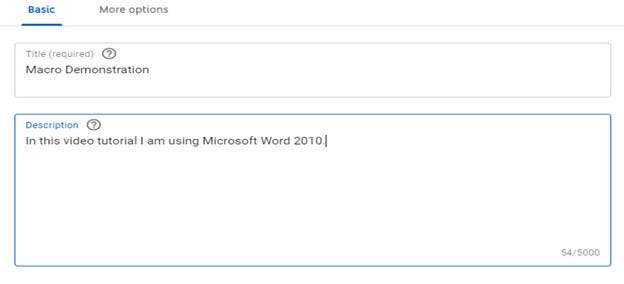
My first suggestion for improvement on Content is to remind the viewer of which version of Microsoft Word you are using and if there are differing features between version of Word. Viewers may not know or be aware of what version of Microsoft Word they are using and that may be problematic for them if they are attempting to program Macros as they follow your directions in the video. In the video titled ““Taming Word 365” you inform the audience that you prefer using Word 2010 and upgrading to Word 365 presents programming challenges. Viewers who visit your YouTube who are familiar with the videos you have available will probably be aware of what version of Microsoft Word you are using, but new viewers may not know that you prefer Word 2010 and new viewers may not be aware of what version of Word they are using if they are not informed or involved in the installation and maintenance of their Office programs. I would recommend having a consistent reminder visually available to inform viewers of the version of Microsoft Word which you are using in your tutorial video. The most visible place to add such information is the space available to describe the video. An example of this can be seen in Figure 1.1 below:
Another feature that YouTube offers is adding Cards to your video to increase interactivity. The positive aspect of using Cards and End Screens is that integrate seamlessly into the already uploaded video. No changes are made to the already present video as the Cards and End Screens are separate video elements. You can change the information which appears on the Cards and End Screens anytime you wish and since these elements are separate from the uploaded video they may be updated or deleted or revised according to your discretion.
Component 2: Structure
The six videos selected for evaluation were consistent in following the traditional narrative learning structure of introducing the action to be learned or performed, the process of how to perform the action and the results of the action in operation.
Positives
There is internal consistency of visual presentation and content across the six videos I evaluated. There were no noticeable differences across the visual structures of the videos other than viewers can see you work in real-time in a video window in “Wildcarding techniques 1” while only your voice appears in “Speedy Navigation 2 PS.” I do think that the real-time video window in which you appear adds a degree of congeniality towards the viewer.
Suggestions for Improvement
For videos with a running time of more than 10 minutes, I would recommend a display of time cues or time stamps that would inform the viewer of the progression of the video.
Figure 2.1 is a screenshot from the longest running video, “Wildcarding techniques 1.” Experienced Macros users may not have a difficult time understanding where you are in regard to the progression of programming commands, but a new viewer who has not watched the video from the beginning and loses their place or is returning to view the video again may find it confusing to locate the exact place in time where they previously were. See the figure below:
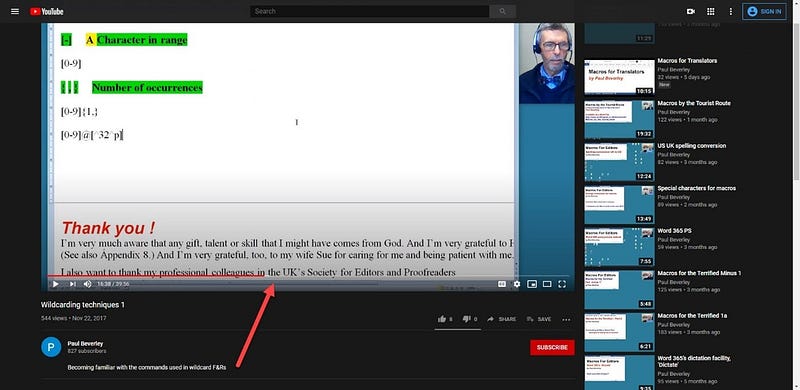
In Figure 2.1 above, there are no visual cues or references to what stage of progress you have reached in the tutorial. Returning viewers and experienced users of Macros may appreciate having a reference of list of the steps of progress you make so they can point-and-click to a specific desired time in the video. For example, YouTube users who post videos of recordings of concerts will often include a list of time cues in the description of the video so viewers can see which songs appear at what time in the video. If a user wanted to jump to a certain time in the video’s running length, they could click on the video’s progress bar and scroll to the exact time listed in the description. YouTube also offers a right-click function in which a user can “Copy video URL at current time” and have a URL that will start the video at the current running time in which the video was at when right-clicking. The process of capturing clickable URL’s and making the available in the video description would offer experienced users of Macros and returning viewers the ability to jump to a specific point of time and progress in one of the longer running videos.
Figure 2.2 is a screenshot from a recorded concert video on YouTube. In the video’s description there are clickable time cues on the left, in the “About” section, which will take the user to a specific point-of-time in the video:
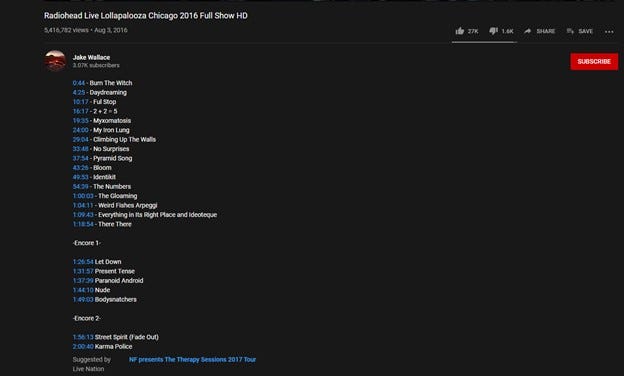
For longer running videos, those more than 10 minutes in length such as “Programming Word macros 4” and “Taming Word 365” it would be helpful to the viewer if they had a way of accessing specific points-in-time in the video. Adding these time cues is as easy as right-clicking and copying on a video which is paused at the desired time and adding the clickable link with a text description next to it. In the editing functions YouTube, you can add this information in the “About” section and the information will appear beneath the video, as it appears in Figure 1.1.
Component 3: Cohesion
In evaluating the cohesion of the six selected videos, my feedback is based upon viewing the six videos and how they relate and connect to the other videos on your channel. The primary point of evaluating Cohesion is to determine how well the videos relate to one another and the subject of programming Macros.
Positives
I referenced the titles of the 140 available videos to view on your YouTube channel and all the videos are focused on programming and running Macros in Microsoft Word. I did not find any problems of consistency or continuity.
Suggestions for Improvement
Of the 140 videos available, there appear to be three types of videos available to viewers: 1. Single, topical videos which address programming a specific Macro function, 2. Single topic videos which are part of a series of programming a specific Macro function, 3. Special interest topical videos which may have a related video that was recorded at a later date. My primary suggestion for improvement which would greatly improve the cohesion of your channel is to organize a series of playlists in YouTube.
Creating and managing playlists is a simple and effective way to maximize organization of content:
https://support.google.com/youtube/answer/57792?hl=en&ref_topic=9257511
I would also recommend the Cards and End Screens to feature the playlists before the video starts and after the video contents. By doing this you offer new and experienced viewers a shortcut to continue viewing the other videos which are available.
One way of organizing the playlists could be by number of videos in a topical series. Table 4.1 features an example of an organizational pattern sorted by topic name and number of videos related:

When a user visits your YouTube channel and they click on the “Playlists” link, they would be taken a page in which your curated playlists can be sorted by from oldest to newest. Playlists also group all the videos together on the Playlists section of your YouTube channel, so a viewer would not have to search through the master list of all your available videos to find what they are looking. Using the Playlist feature would have all the videos listed in sequence and a viewer could select which one they wished to view. If they wish to the view a series of videos you have done from the first video to the last it would be as simple as clicking on the first video in the playlist. YouTube will play the videos in any playlist from first to last without viewer prompting.
I recommend creating Playlists to organize and sort your videos. That would offer the experienced, returning viewer the option to find what they are looking for more easily. For new viewers the titles of the playlists will assist them in choosing which video or video series to begin viewing. Playlists are functional shortcuts, and you can also feature the playlist links in the Cards and End Screens to promote the other videos and video series available to view.
Creating and managing Playlists is the most simple and direct way to promote cohesion across your channel.
Summary of Evaluation
The videos on your channel are products of your expertise, so to evaluate the visual content of the videos themselves falls beyond the scope of my authority as evaluator. My evaluation is grounded in the position that I am a viewer of YouTube videos and my perspective for this evaluation is that of user experience. Any changes to the visual content of the videos would be at your discretion.
Mr. Beverly, I want to again express my sincere thanks for the opportunity to evaluate and offer feedback for improving your YouTube channel. My objective with this evaluation was to take a selection of videos available on your channel and evaluate them as a representative sample of overall content. I formulated 3 components of evaluation that were the most relative to the video viewing experience. The suggested improvements focused on viewer interaction and how to maximize the ease of the viewing experience as well as encouraging viewer loyalty to returning to the channel and subscribing.
Mr. Beverly, please contact me at your convenience when you have finished reading this evaluation. I would very much like to receive your feedback, either verbally or non-verbally, and discuss any further services that the Rosbury Group can provide. My email address and telephone number are listed below. If you would like to meet virtually, please email me and we can make further arrangements. Thank you for using The Rosbury Group!
Regards,
Andrew F. Rosbury
—
This was a an assignment submission for a class in Editing Technical Documents taken at the University of North Texas, Fall 2020 Semester.
 Andrew F. Rosbury
Leave a comment